Case Study
Nigel the Coding Butler: Giving an AI agent eyes and hands on the web
I combined ElevenLabs with Webfuse to build an AI agent that could inspect and control the webpage around it, then wrapped the idea in a deliberately memorable demo.
- Technical Build
- Technical Sales
- Communication

Nigel in action
See the agent inspect, click, type, navigate and modify the page in real time.
The Problem
Embedded AI agents on the web have a visibility problem. Normally, an agent embedded in a third-party iframe can't see the page content the user sees. It might be able to answer questions, but it doesn't know what's actually on the page and it can't assist on the interface. Webfuse's Automation API gave us a way around that limitation.
However, figuring out how to communicate this to prospects presented its own challenges. Webfuse has some unusual architecture behind it but it makes far more sense to explain this once a prospect knows why they should care.
Nigel was built to show an AI agent doing something new in a memorable way.
Why It Mattered
Agentic AI was coming up more and more in customer conversations and Webfuse gave us a way to extend what an existing agent could actually do inside a browsing session.
That was much easier to understand when people could see it.
At a conference booth there might only be a few minutes to get someone's attention. The same was true in early prospect conversations. A diagram of the architecture is useful later, but it's a poor opener.
I wanted something interesting, shareable and a bit different that could make the idea click almost immediately.
The Insight
Show, don't tell. Demonstrate something that should not normally be possible, then explain how it works once the audience is engaged.
Make the capability obvious first. Explain the architecture afterwards.
I also knew a generic AI assistant in a sea of similar demos would be forgettable, so I decided to make the agent itself part of the demo.
What I Did
I built an ElevenLabs agent called Nigel the Coding Butler.
Our developers helped me map some of the Webfuse Automation API tools into ElevenLabs. I then used the ElevenLabs SDK to build the custom widget, styling and demo flow around a bombastic butler personality I'd designed.
Nigel could:
- inspect snapshots of the current page DOM
- move the mouse
- click
- scroll
- type into fields
- navigate interfaces
- generate and inject JavaScript or CSS into the page.
The DOM access was the important first step.
A snapshot of the page could be passed back to Nigel's LLM, which meant he could reason over the page the user was actually looking at. Once he understood the page, Webfuse's automation APIs gave him a way to act on it.
Nigel had access to a code-injection tool. That meant the agent could inspect a page, work out what needed changing based on the user's request and page context, generate some JavaScript or CSS and apply the change immediately. It was intentionally overpowered for the demo. Showing the extremes made the possibilities obvious.
I made Nigel deliberately ridiculous: a formal, sarcastic and slightly absurd British butler. A generic assistant doing the same things would have been much easier to forget.
The Demo
The featured video above shows the idea properly: Nigel reading the page, navigating it, entering information and changing the site in real time.
I also built a standalone landing page so the demo could be shared rather than only shown live. Letting someone enter any URL also made another point clear: these capabilities could be used on an arbitrary webpage without modifying the site itself or installing anything server-side.
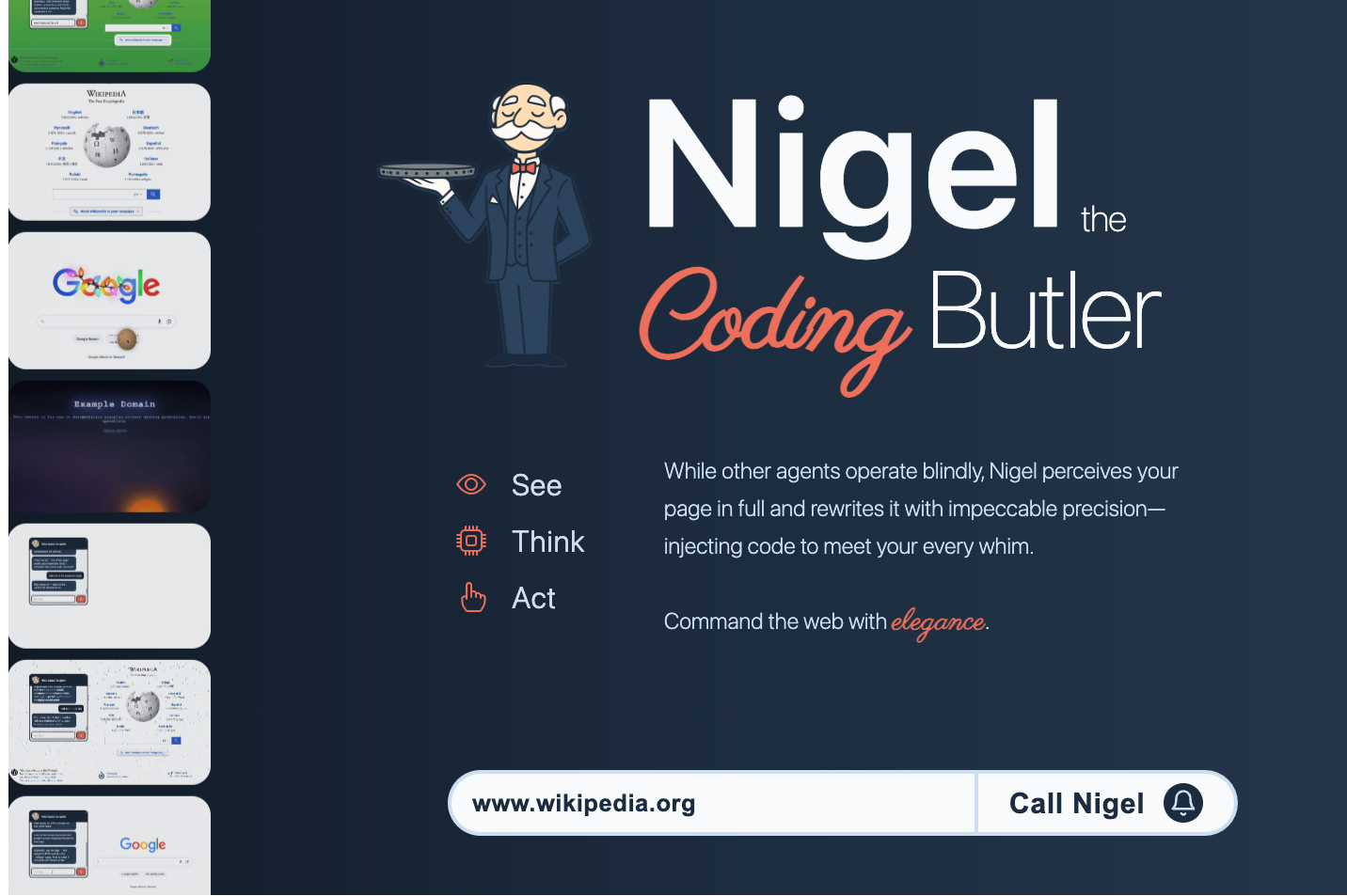
Someone could paste in any website URL, launch it through Webfuse and then call Nigel into the session.
It was never supposed to represent a real business workflow. It's a fun way to show something new and get people thinking about what the same access could mean in a more serious use case. Other more refined demos could then be built for specific workflows once a prospect understood the possibilities.
How It Works
Nigel runs as an ElevenLabs agent inside a Webfuse session.
Webfuse sessions support extensions that work in a similar way to browser extensions, with separate parts able to communicate with each other and with the page.
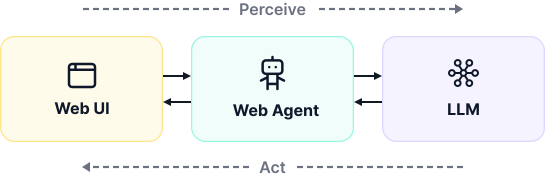
The basic loop looked like this:
-
The user asks Nigel to do something.
For example: “Help me fill out this form.” -
Nigel requests page context.
A custom tool requests a snapshot of the current DOM through the Webfuse extension. -
The DOM snapshot goes back to the LLM.
Nigel can now reason over the actual page instead of operating blindly from inside the widget. -
Nigel chooses an action.
Webfuse automation tools let him move the mouse, click, scroll, type or navigate. -
The user sees it happen.
The action takes place directly on the page.
The code-injection tool used the same pattern. Nigel could inspect the DOM, generate JavaScript or CSS based on what he found, then send that code back through the extension and execute it on the page through the extension content script.
In practice, the useful mental model was simple: See, Think, Do. Webfuse let the LLM see the page, reason about what it wanted to do, then gave it the tools to act.
Impact
Nigel became one of the demos we used to explain Webfuse's potential for agentic AI.
We used him at an agentic AI conference, in marketing content and in conversations with prospects who needed a quick sense of what the technology could enable.
Nigel was there to get the idea across quickly and open the door to more targeted demonstrations of real-world applications.